Generate answers
With a questionnaire Ready, SolveGRC can draft an answer for every question. Each draft is grounded in your evidence, quotes its sources, and arrives marked for review. It is never auto-approved.
Draft answers for the whole questionnaire
On a Ready card, click Process AI. SolveGRC queues one drafting job per unanswered question and moves the questionnaire to In progress. Answers fill in as the jobs run, and the card's progress bar climbs. You don't have to wait on the page; come back later and the drafts will be there.
You can also draft a single answer at a time from the Review Center, which is handy for regenerating one question after adding new evidence. That's covered on the Review and approve page.
What happens when the AI drafts an answer
For each question, SolveGRC runs a retrieval-augmented pipeline:
- Retrieve your evidence. It searches your document library for the passages most relevant to the question, blending meaning-based and keyword search, and pulls the strongest matches.
- Reuse what you've approved. It looks for similar questions you've already approved answers to and feeds those in as examples, so the wording stays consistent with your house style. (More on this below.)
- Draft with citations. The model writes an answer grounded in those passages, and every claim quotes the exact text it came from.
- Score and check itself. It reports a confidence level, verifies each citation actually appears in its source, and flags the answer if anything doesn't hold up.
The result is saved as a pending answer, ready for a person to review, edit, and approve.
If the library has nothing relevant to a question, SolveGRC won't invent an answer. It says plainly that the evidence doesn't cover the question and prompts you to add supporting documents. That's the system working as intended: it surfaces a question it can't ground instead of guessing at it.
The Answer Library grows as you approve
The "Answer Library" isn't a separate place you manage. It's every answer your team has approved. When the AI drafts a new answer, it pulls your most similar approved answers in as reference examples.
That has a practical consequence worth planning around:
Until you've approved some answers, there's nothing for the AI to reuse, so early drafts lean entirely on your document library. As you review and approve, the answers get more consistent and sound more like your team. Approving good answers is what makes the next questionnaire faster.
Reading the trust signals
Every draft carries three signals, shown together in the Review Center:
- Confidence. The model's own read on how well the evidence supported the answer, as a percentage. Treat it as a triage hint rather than a grade. Low confidence means look closely; it doesn't mean the answer is wrong.
- Citations. The sources behind the answer, each with the verbatim passage it quotes. SolveGRC checks that the quote really appears in the cited document, and flags one that contradicts its source.
- Integrity. A clean-or-flagged hallucination check. A flagged answer has a citation that didn't hold up, so it shouldn't go out as-is.
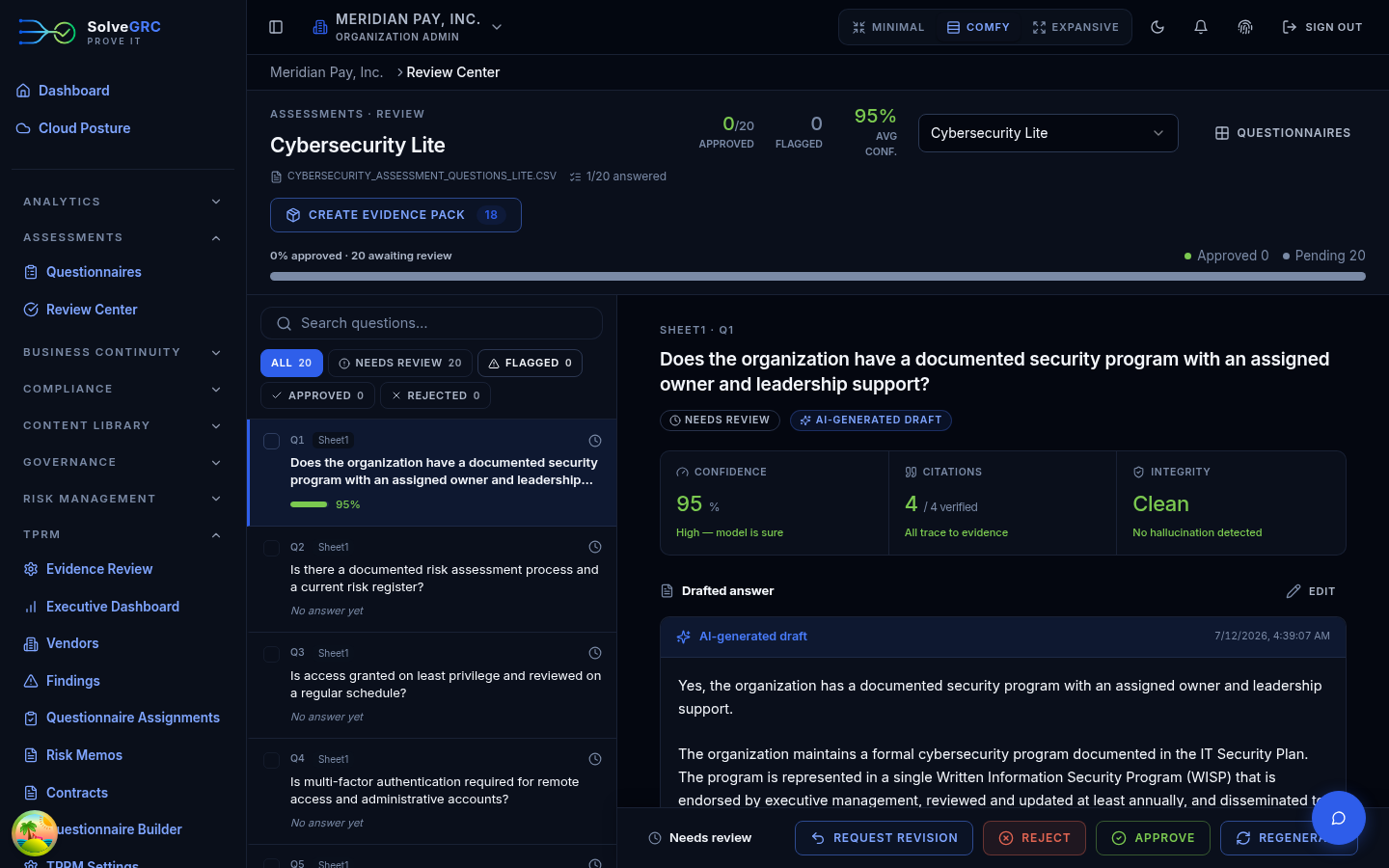
You act on all three during review, which is next: Review and approve.
A note on how answers are authored
SolveGRC's platform model does the final grounded drafting and scoring, so every answer is checked the same way. If your organization has connected its own model (bring-your-own), that model can produce a first draft, but the platform still does the final grounded, cited version. The record notes which model did what, so authorship is never overstated. Automated safety filters run over the input and output, and any masking or safety flag is recorded rather than hidden.